AI estimating & client center

Estimator Agent

An AI assistant that prices your next job from real material costs, builds the estimate, and runs the client side of your business — invoicing, payments, and scheduling — from one place.

Estimator Agent pulls real prices, calculates exact quantities, and hands you an accurate number in minutes — so you can quote fast, quote right, and win the job.

2–8 hrs

Typical time to put together a manual estimate — more for bigger jobs

Under 5 min

With Estimator Agent — just enter your square footage and get your number

How it works

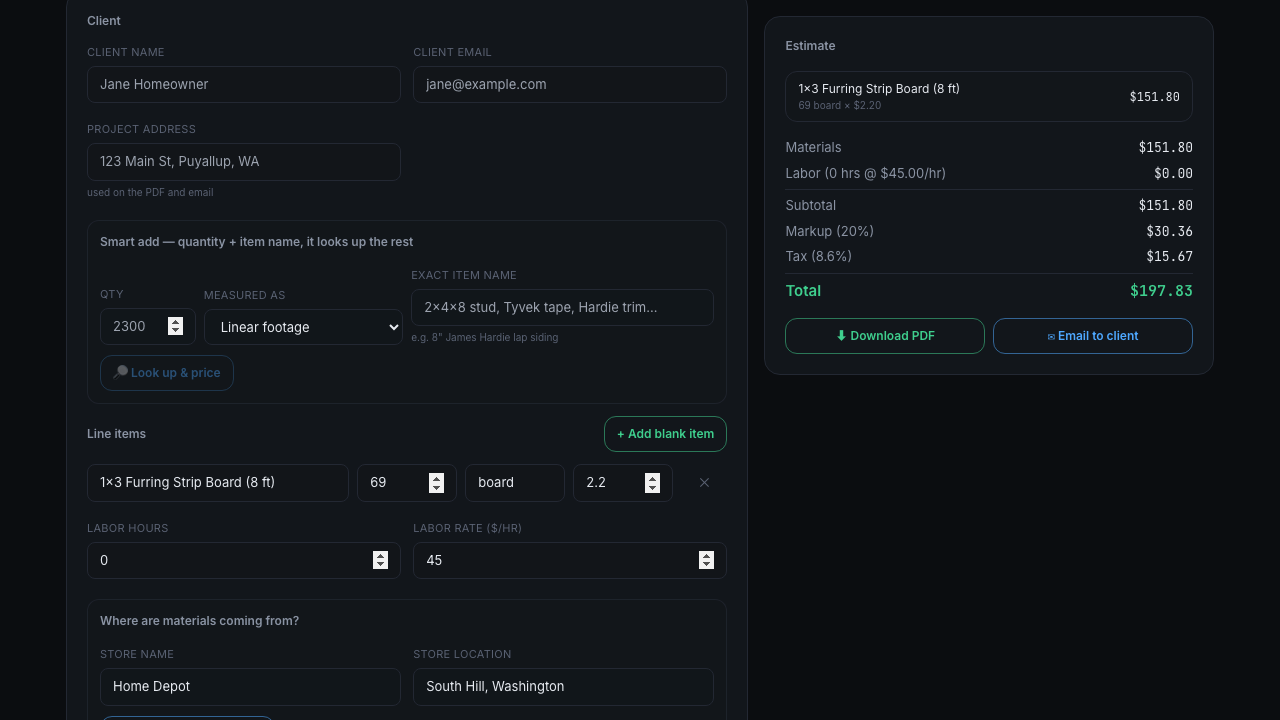
Give the Estimator Agent a material name and the stores you buy from, and it looks up real, current prices for you — no more guessing or digging through supplier sites. Tell it your square or linear footage plus the exact material, and it calculates the quantities you need automatically. Already know exactly what you need? Add it like a line on a calculator — say "tape × 5" — and it's priced and added instantly.

Every plan also bundles a full Client Center: a CRM built for how contractors actually work. Send professional PDF & email invoices, collect payment through your own linked payment processor — no one but you ever sees your payment info, it flows straight to your account — and keep every saved estimate organized by client and job. A built-in scheduling calendar tracks project start dates, job walks, and any custom entries you add, and sends automated day-before email reminders so nothing slips through the cracks.

Built for the field, not the office

  • Real prices from the stores you actually shop at
  • Quantities calculated from your measurements
  • One-click add for known-quantity items
  • Payments route straight to your own processor
Pricing

Simple, one-time setup — then a flat monthly rate

Every plan includes the same one-time setup fee to get your Estimator Agent configured and connected to your business.

Standard
Everything you need to price and manage jobs day to day.
One-time setup: $1,450.89
$497/mo
  • 40 estimates per month
  • Full client CRM — client center & project tracking
  • Calendar scheduling — start dates, job walks, custom entries
  • Automated email reminders for scheduled items
  • PDF & email invoicing
  • Payment processor link — one-click pay for clients
  • Google review link embedded in estimates
+ Blueprint upload available as a $350/mo add-on at checkout

Going over your monthly estimate limit just pauses saving new Jobs until next month — you can still build and price estimates freely, and upgrading to Pro (or adding Blueprint upload to Standard) any time is one message away, no need to cancel or restart.

Pro exclusive

Blueprint upload

Turns a photo or PDF of your blueprint into a complete, priced materials estimate — automatically.

Upload a photo or file of the blueprint on the estimator and tell it the scope of the job — for example, "roofing remodel" or "siding remodel." From there it reads the plan, works out every material and quantity you need straight from the square footage and linear footage on the page, and looks up real current prices from whichever store you buy from (just enter the store name and location). Everything gets added to your estimate already priced and totaled — all you have to do is add your labor, either a flat rate or by the hour.

How you'll access your Estimator Agent

Once your agent is set up, we'll send you a personal link to open it — bookmark it, that's how you'll get to your estimator and Client Center from now on.

This link is unique to your business — please don't share it with anyone.

Illustrative example — not a real customer's data

What a Blueprint upload run looks like

You provide
  • A photo/PDF of a 60 × 40 ft backyard plan
  • Job scope: "Landscaping remodel"
  • Store: Home Depot, Puyallup WA
Estimator Agent produces
  • Pavers, base gravel & sand for a 16×12 patio
  • Sod for the remaining lawn area
  • Retaining wall blocks, fence panels/posts, a gate kit & drip irrigation
  • Every line already priced from your store — full materials subtotal, ready in minutes
Getting started

Using your Client Center — the quick version

1. Build the estimate

Enter your measurements and materials (or upload a blueprint if you're on Pro), set the store you're buying from, and click "Look up & price all" — the priced estimate builds itself on the right as each item comes back.

2. Save it under the client

Click "Save as Job" to file the estimate under that client's name — this is what makes it show up in your Client Center and calendar, so don't skip it even if you're just testing a number.

3. Invoice & get paid

From the job's page, send a PDF invoice by email with one click. Clients can pay straight through your linked payment processor — the money goes directly to your account, nothing passes through us.

4. Let the calendar handle reminders

Add a start date or job walk on the job's page and it lands on your calendar automatically — you and your client both get an email reminder the day before, with nothing extra to set up.

Still have a question?

We'd love to help. No sales pitch — just answers.